#include <AMapNaviWalkView.h>
Instance Methods | |
| (void) | - addEventListener: |
| 增加用于接收View回调事件的Listener, 效果等同于delegate. 注意:该方法不会增加实例对象的引用计数(Weak Reference). since 10.1.300 | |
| (void) | - removeEventListener: |
| 移除用于接收View回调事件的Listener. since 10.1.300 | |
| (BOOL showSensorHeading) | - __attribute |
| (void) | - setCustomMapStyleOptions: |
| 自定义地图样式设置,可以支持分级样式配置,如控制不同级别显示不同的颜色 (自 6.6.0 开始使用新版样式,旧版样式无法在新版接口 setCustomMapStyleOptions:(MAMapCustomStyleOptions *)styleOptions 中使用,请到官网 (lbs.amap.com) 更新新版样式文件) Custom map style settings can support hierarchical style configurations, such as controlling different levels to display different colors (starting from version 6.6.0, the new style is used, and the old style cannot be used in the new interface setCustomMapStyleOptions:(MAMapCustomStyleOptions *)styleOptions, please update the new style file on the official website (lbs.amap.com)) | |
| (UIImage *normalTexture) | - __attribute |
| (UIImage *greyTexture) | - __attribute |
| (void) | - updateRoutePolylineInTheVisualRangeWhenTheShowModeIsOverview |
| 在全览状态下调用此函数能够让路线显示在可视区域内(排除EdgePadding后剩余的区域),保证路线不被自定义界面元素遮挡. 比如showUIElements为NO时(自定义界面)横竖屏切换后,可以调用此函数. since 8.0.0 Calling this function in overview mode ensures the route is displayed within the visible area (remaining region after excluding EdgePadding), preventing the route from being obscured by custom UI elements. For example, when showUIElements is set to NO (custom interface), this function can be called after switching between portrait and landscape modes. | |
| (void) | - setStartPointImage: |
| 设置路径起点图标 Set route start point icon | |
| (void) | - setEndPointImage: |
| 设置路径终点图标 Set route end point icon | |
| (void) | - setCarImage: |
| 设置自车图标 Set vehicle icon | |
| (void) | - setCarCompassImage: |
| 设置自车罗盘图标 Set vehicle compass icon | |
| (void) | - setWayPointImage: |
| 设置路径途经点图标 since 9.3.5 Set route waypoint icon | |
| (BOOL) | - addAnnotation: |
| 在导航地图中添加自定义标注. since 11.1.200 需要在自定义walkView被此接口addDataRepresentativer添加后调用,否则会添加失败 Add custom annotations to the navigation map. since 11.1.200 This method must be called after the custom walkView is added by the addDataRepresentativer interface, otherwise the addition will fail 注意:生效范围 行前 行中 Note: Effective scope is currently in progress | |
| (void) | - removeAnnotation: |
| 移除导航地图中的自定义标注. since 11.1.200 Remove custom annotations from the navigation map. since 11.1.200 注意:生效范围 行前 行中 Note: Effective scope is currently in progress | |
| (void) | - addCustomAnnotation: |
| 在导航地图中添加自定义标注. since 11.1.200 Add custom annotations to the navigation map 注意:生效范围 行前 行中 Note: Effective scope is currently in progress | |
| (void) | - removeCustomAnnotation: |
| 移除导航地图中的自定义标注. since 11.1.200 Remove custom annotations from the navigation map 注意:生效范围 行前 行中 Note: Effective scope is currently in progress | |
| (void) | - addCustomOverlay: |
| 在导航地图中添加自定义overlay. since 11.1.200 Add custom overlay to the navigation map 注意:生效范围 行前 行中 Note: Effective scope is currently in progress | |
| (void) | - removeCustomOverlay: |
| 移除导航地图中的自定义overlay. since 11.1.200 Remove custom overlay from navigation map 注意:生效范围 行前 行中 Note: Effective scope is currently in progress | |
 Instance Methods inherited from <AMapNaviWalkDataRepresentable> Instance Methods inherited from <AMapNaviWalkDataRepresentable> | |
| (void) | - walkManager:updateNaviMode: |
| 导航模式更新回调 Navigation mode update callback | |
| (void) | - walkManager:updateNaviRouteID: |
| 路径ID更新回调. 注意:请不要在此回调中调用 -selectNaviRouteWithRouteID: 接口,否则会出现死循环调用. Route ID update callback. Note: Please do not call the -selectNaviRouteWithRouteID: interface in this callback, otherwise it will cause an infinite loop call. | |
| (void) | - walkManager:updateNaviRoute: |
| 路径信息更新回调. 注意:请不要在此回调中调用 -selectNaviRouteWithRouteID: 接口,否则会出现死循环调用. Path Information Update Callback. Note: Please do not call the -selectNaviRouteWithRouteID: interface in this callback, otherwise it will cause an infinite loop call. | |
| (void) | - walkManager:updateNaviInfo: |
| 导航信息更新回调 Navigation Information Update Callback | |
| (void) | - walkManager:updateNaviLocation: |
| 自车位置更新回调 Self-Vehicle Position Update Callback | |
Properties | |
| id< AMapNaviWalkViewDelegate > | delegate |
| BOOL | isLandscape |
| AMapNaviViewTrackingMode | trackingMode |
| AMapNaviWalkViewShowMode | showMode |
| BOOL | showUIElements |
| BOOL | showBrowseRouteButton |
| BOOL | showMoreButton |
| BOOL | showTurnArrow |
| AMapNaviViewMapModeType | mapViewModeType |
| AMapNaviRouteAnnoState | showRouteAnnotation |
| BOOL | logoEnable |
| CGFloat | logoSizeScale |
| MALogoLanguage | logoLanguage |
| BOOL | showCompass |
| CGFloat | cameraDegree |
| BOOL | showScale |
| CGPoint | scaleOrigin |
| CGPoint | screenAnchor |
| CGPoint | compassOrigin |
| BOOL | autoZoomMapLevel |
| CGFloat | mapZoomLevel |
| CGFloat | lineWidth |
| BOOL | showGreyAfterPass |
| AMapNaviPolylineGreyColor * | routeGreyColor |
| AMapNaviPolylineTrafficStatusColor * | routeStatusColor |
| BOOL | onlyForGuide |
Detailed Description
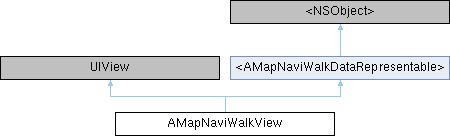
步行导航界面.该类实现 AMapNaviWalkDataRepresentable 协议,可通过 AMapNaviWalkManager 的addDataRepresentative:方法进行注册展示步行导航过程. Walking navigation interface, This class implements the AMapNaviWalkDataRepresentable protocol and can be registered to display the walking navigation process through the addDataRepresentative: method of AMapNaviWalkManager.
Method Documentation
◆ __attribute [1/3]
| - (UIImage *greyTexture) __attribute | ((deprecated("Deprecated, please use routeGreyColor instead. since 10.0.900"))) |
路线纹理部分走过后置灰的纹理图片,设置nil恢复默认纹理. 纹理图片需满足:长宽相等,且宽度值为2的次幂. since 7.4.0 The texture image of the route texture after being partially traveled, set nil to restore default texture. The texture image must meet: equal length and width, and the width value must be a power of 2.
◆ __attribute [2/3]
| - (UIImage *normalTexture) __attribute | ((deprecated("Deprecated, please use routeStatusColor instead. since 10.0.900"))) |
标准路线Polyline的纹理图片,设置nil恢复默认纹理.纹理图片需满足:长宽相等,且宽度值为2的次幂 Texture image for standard route Polyline, set nil to restore default texture. The texture image must meet: equal length and width, and the width value must be a power of 2.
◆ __attribute [3/3]
| - (BOOL showSensorHeading) __attribute | ((deprecated("Deprecated, the direction of the self-car icon will display as the device orientation, no longer supports setting. since 10.0.900"))) |
是否显示传感器方向信息,默认NO.设置为YES后,自车图标方向将显示为设备方向 Whether to display sensor orientation information, default NO. After setting to YES, the direction of the self-car icon will display as the device orientation
◆ addAnnotation:
| - (BOOL) addAnnotation: | (AMapNaviCustomAnnotation *) | annotation |
在导航地图中添加自定义标注. since 11.1.200 需要在自定义walkView被此接口addDataRepresentativer添加后调用,否则会添加失败 Add custom annotations to the navigation map. since 11.1.200 This method must be called after the custom walkView is added by the addDataRepresentativer interface, otherwise the addition will fail 注意:生效范围 行前 行中 Note: Effective scope is currently in progress
- Parameters
-
annotation 具体参考 AMapNaviCustomAnnotation Refer to AMapNaviCustomAnnotation for details
- Returns
- 返回是否添加成功 Return whether the addition was successful
◆ addCustomAnnotation:
| - (void) addCustomAnnotation: | (AMapNaviCompositeCustomAnnotation *) | annotation |
在导航地图中添加自定义标注. since 11.1.200 Add custom annotations to the navigation map 注意:生效范围 行前 行中 Note: Effective scope is currently in progress
- Parameters
-
annotation 具体参考 AMapNaviCompositeCustomAnnotation . Refer to AMapNaviCompositeCustomAnnotation
◆ addCustomOverlay:
| - (void) addCustomOverlay: | (id< AMapNaviCompositeOverlay >_Nonnull) | overlay |
在导航地图中添加自定义overlay. since 11.1.200 Add custom overlay to the navigation map 注意:生效范围 行前 行中 Note: Effective scope is currently in progress
- Parameters
-
overlay 具体参考 官方Demo中 DriveViewWithCustomOverlayViewController . For details, refer to the official Demo DriveViewWithCustomOverlayViewController
◆ addEventListener:
| - (void) addEventListener: | (id< AMapNaviWalkViewDelegate >) | aListener |
增加用于接收View回调事件的Listener, 效果等同于delegate. 注意:该方法不会增加实例对象的引用计数(Weak Reference). since 10.1.300
- Parameters
-
aListener 实现了 AMapNaviWalkViewDelegate 协议的实例
◆ removeAnnotation:
| - (void) removeAnnotation: | (AMapNaviCustomAnnotation *) | annotation |
移除导航地图中的自定义标注. since 11.1.200 Remove custom annotations from the navigation map. since 11.1.200 注意:生效范围 行前 行中 Note: Effective scope is currently in progress
- Parameters
-
annotation 自定义标注对象. Custom annotation object.
◆ removeCustomAnnotation:
| - (void) removeCustomAnnotation: | (AMapNaviCompositeCustomAnnotation *) | annotation |
移除导航地图中的自定义标注. since 11.1.200 Remove custom annotations from the navigation map 注意:生效范围 行前 行中 Note: Effective scope is currently in progress
- Parameters
-
annotation 具体参考 AMapNaviCompositeCustomAnnotation . Refer to AMapNaviCompositeCustomAnnotation
◆ removeCustomOverlay:
| - (void) removeCustomOverlay: | (id< AMapNaviCompositeOverlay >_Nonnull) | overlay |
移除导航地图中的自定义overlay. since 11.1.200 Remove custom overlay from navigation map 注意:生效范围 行前 行中 Note: Effective scope is currently in progress
- Parameters
-
overlay 具体参考 AMapNaviCompositeOverlay . Refer to AMapNaviCompositeOverlay
◆ removeEventListener:
| - (void) removeEventListener: | (id< AMapNaviWalkViewDelegate >) | aListener |
移除用于接收View回调事件的Listener. since 10.1.300
- Parameters
-
aListener 实现了 AMapNaviWalkViewDelegate 协议的实例
◆ setCarCompassImage:
| - (void) setCarCompassImage: | (nullable UIImage *) | carCompassImage |
设置自车罗盘图标 Set vehicle compass icon
- Parameters
-
carCompassImage 自车罗盘图标 Vehicle compass icon
◆ setCarImage:
| - (void) setCarImage: | (nullable UIImage *) | carImage |
设置自车图标 Set vehicle icon
- Parameters
-
carImage 自车图标 Vehicle icon
◆ setCustomMapStyleOptions:
| - (void) setCustomMapStyleOptions: | ((deprecated("Custom View no longer supports custom map style. Since 11.1.000"))) | __attribute |
自定义地图样式设置,可以支持分级样式配置,如控制不同级别显示不同的颜色 (自 6.6.0 开始使用新版样式,旧版样式无法在新版接口 setCustomMapStyleOptions:(MAMapCustomStyleOptions *)styleOptions 中使用,请到官网 (lbs.amap.com) 更新新版样式文件) Custom map style settings can support hierarchical style configurations, such as controlling different levels to display different colors (starting from version 6.6.0, the new style is used, and the old style cannot be used in the new interface setCustomMapStyleOptions:(MAMapCustomStyleOptions *)styleOptions, please update the new style file on the official website (lbs.amap.com))
- Parameters
-
styleOptions 自定义样式 options. since 6.6.0 Custom style options
◆ setEndPointImage:
| - (void) setEndPointImage: | (nullable UIImage *) | endPointImage |
设置路径终点图标 Set route end point icon
- Parameters
-
endPointImage 终点图标 End point icon
◆ setStartPointImage:
| - (void) setStartPointImage: | (nullable UIImage *) | startPointImage |
设置路径起点图标 Set route start point icon
- Parameters
-
startPointImage 起点图标 Start point icon
◆ setWayPointImage:
| - (void) setWayPointImage: | (nullable UIImage *) | wayPointImage |
设置路径途经点图标 since 9.3.5 Set route waypoint icon
- Parameters
-
wayPointImage 途经点图标 Waypoint icon
◆ updateRoutePolylineInTheVisualRangeWhenTheShowModeIsOverview
| - (void) updateRoutePolylineInTheVisualRangeWhenTheShowModeIsOverview |
在全览状态下调用此函数能够让路线显示在可视区域内(排除EdgePadding后剩余的区域),保证路线不被自定义界面元素遮挡. 比如showUIElements为NO时(自定义界面)横竖屏切换后,可以调用此函数. since 8.0.0 Calling this function in overview mode ensures the route is displayed within the visible area (remaining region after excluding EdgePadding), preventing the route from being obscured by custom UI elements. For example, when showUIElements is set to NO (custom interface), this function can be called after switching between portrait and landscape modes.
Property Documentation
◆ autoZoomMapLevel
|
readwritenonatomicassign |
锁车模式下是否为了预见下一导航动作自动缩放地图,默认为 NO. since 11.1.200 Whether to automatically zoom the map to predict the next navigation action in locked vehicle mode. Default: NO. Since 11.1.200.
◆ cameraDegree
|
readwritenonatomicassign |
非锁车状态下地图cameraDegree,锁车态下内部会处理,默认35.0,范围[0,60]。since 10.0.900 Map cameraDegree in the unlocked state, it will be handled internally in the locked state, default is 35.0, range [0,60]
◆ compassOrigin
|
readwritenonatomicassign |
指南针原点位置。since 8.0.0 The origin position of the compass
◆ delegate
|
readwritenonatomicweak |
实现了 AMapNaviWalkViewDelegate 协议的类指针 Implements the class pointer of the AMapNaviWalkViewDelegate protocol
◆ isLandscape
|
readnonatomicassign |
目前是否为横屏状态. since 7.4.0 内部会自行监听 UIDeviceOrientationDidChange 进行横竖屏切换,无需再设置此值,但用户要自行保证 AMapNaviWalkView.autoresizingMask = UIViewAutoresizingFlexibleWidth | UIViewAutoresizingFlexibleHeight,让 AMapNaviWalkView 能够跟着父View一起变化. 可通过回调 -walkView:didChangeOrientation: 获取横竖屏切换时机 Whether it is currently in landscape mode. Since 7.4.0, the system automatically monitors UIDeviceOrientationDidChange for landscape/portrait switching, no need to set this value anymore. However, users must ensure that AMapNaviWalkView.autoresizingMask = UIViewAutoresizingFlexibleWidth | UIViewAutoresizingFlexibleHeight allows AMapNaviWalkView to change along with the parent View. The timing of screen orientation changes can be obtained through the callback -walkView:didChangeOrientation:
◆ lineWidth
|
readwritenonatomicassign |
路线polyline的宽度,设置0恢复默认宽度 The width of the route polyline, set to 0 to restore the default width.
◆ logoEnable
|
readwritenonatomicassign |
是否显示logo,仅支持海外包设置,默认NO Whether to display the logo is only supported in overseas packages; the default is NO.
◆ logoLanguage
|
readwritenonatomicassign |
设置logo语言。国内包: 支持中文与英文, 默认中文。海外包:仅支持英文,默认英文。 set logo language. Domestic package: supports Chinese and English, default Chinese; Overseas package: supports English only, default English.
◆ logoSizeScale
|
readwritenonatomicassign |
当前地图Logo的尺寸缩放比例 The size scale of the current map logo.
◆ mapViewModeType
|
readwritenonatomicassign |
导航界面中的地图样式类型,默认为 AMapNaviViewMapModeTypeDay(白天模式) 。注意只支持AMapNaviViewMapModeTypeDay,AMapNaviViewMapModeTypeCustom,且自定义地图只在非导航状态下可正常工作。since 10.1.200 The map style type in the navigation interface, default is AMapNaviViewMapModeTypeDay (day mode). Note: Only AMapNaviViewMapModeTypeDay and AMapNaviViewMapModeTypeCustom are supported, and the custom map only works properly in non-navigation mode
◆ mapZoomLevel
|
readwritenonatomicassign |
当前地图的 zoomLevel;可设置锁车下地图缩放等级(配合在关闭了动态比例尺下生效). since 11.1.200 The current map zoomLevel; can set the map zoom level in locked mode (applies only when dynamic scale is disabled).
- Parameters
-
zoom 缩放等级,取值范围 [14-18],默认 18 Zoom level. Valid range: [14–18]. Default: 18. modified since 11.1.200
◆ onlyForGuide
|
readwritenonatomicassign |
◆ routeGreyColor
|
readwritenonatomicstrong |
◆ routeStatusColor
|
readwritenonatomiccopy |
路线的颜色,在调用 addDataRepresentative 前设置,status 设置为 AMapNaviRouteStatusDefault since 10.0.900 The color of the route should be set before calling addDataRepresentative, with the status set to AMapNaviRouteStatusDefault
◆ scaleOrigin
|
readwritenonatomicassign |
当前地图比例尺的原点位置,默认(10,10)。注意:只有showUIElements为NO时,设置此值才有效。 The origin position of the current map scale, default is (10,10). Note: This value only takes effect when showUIElements is NO.
◆ screenAnchor
|
readwritenonatomicassign |
地图的视图锚点. (0, 0)为左上角,(1, 1)为右下角. 可通过设置此值来改变自车图标的默认显示位置. 注意:只有showUIElements为NO时,设置此值才有效 since 8.0.0 The view anchor point of the map. (0, 0) is the top-left corner, (1, 1) is the bottom-right corner. You can change the default display position of the vehicle icon by setting this value. Note: This value only takes effect when showUIElements is NO.
◆ showBrowseRouteButton
|
readwritenonatomicassign |
是否显示全览按钮,默认YES Whether to display the overview button, default is YES
◆ showCompass
|
readwritenonatomicassign |
是否显示指南针,默认NO Whether to display the compass, default is NO
◆ showGreyAfterPass
|
readwritenonatomicassign |
走过的路线是否置灰,默认为NO. since 7.4.0 Whether the traveled route is grayed out, default is NO.
◆ showMode
|
readwritenonatomicassign |
导航界面显示模式,默认AMapNaviWalkViewShowModeCarPositionLocked Navigation interface display mode, default is AMapNaviWalkViewShowModeCarPositionLocked
◆ showMoreButton
|
readwritenonatomicassign |
是否显示更多按钮,默认YES Whether to display the more button, default is YES
◆ showRouteAnnotation
|
readwritenonatomicassign |
是否显示起终途点\步行轮渡扎点\禁行限行图标\封路图标等,默认为全显示.(本View,不支持轮渡点、禁限行、封路图标) Whether to display start/end points, pedestrian/ferry stop points, prohibited driving restriction icons, closed road icons, etc. Defaults to all displayed. (Note: This View does not support ferry points, traffic restriction icons, or closed road icons.)
- Since
- 11.1.200
◆ showScale
|
readwritenonatomicassign |
当前地图是否显示比例尺,默认NO。注意:只有showUIElements为NO时,设置此值才有效。 Whether the current map displays the scale, default is NO. Note: This value only takes effect when showUIElements is NO.
◆ showTurnArrow
|
readwritenonatomicassign |
是否显示转向箭头,默认YES Whether to display the turn arrow, default is YES
◆ showUIElements
|
readwritenonatomicassign |
是否显示界面元素,默认YES Whether to display interface elements, default is YES
◆ trackingMode
|
readwritenonatomicassign |
导航界面跟随模式,默认AMapNaviViewTrackingModeMapNorth Navigation interface follow mode, default is AMapNaviViewTrackingModeMapNorth
The documentation for this class was generated from the following file: